FeatureRetail plan

Discount codes

Create a percentage discount, print its QR code on flyers or loyalty cards, and customers scan it at the checkout while shopping. You decide the validity, the maximum number of uses and which stores, categories, suppliers and products it applies to.

Why it matters

Promotions without staff at the checkout

  • One QR code per promotion

    Every discount code has its own QR code. Download it as a PNG and put it into your own flyers, vouchers or posters.

  • Ends by itself

    With “Valid from” and “Valid until” a promotion expires automatically. “Maximum uses” limits how often the code works.

  • Precisely targeted

    Only certain stores, categories, suppliers or products. If several restrictions are set, a product has to meet all of them.

How it works

How customers redeem the code

Nothing extra is needed at the checkout, just the scanner customers already use for products.

  1. 1

    Scan the products

    The customer scans the products as usual.

  2. 2

    Scan the QR code

    They hold the discount code’s QR code to the checkout scanner.

  3. 3

    The checkout checks

    Validity period and maximum uses are checked, and the discount is deducted from the eligible products.

  4. 4

    Pay

    The customer pays the reduced amount. Every redemption raises “Current Uses” by 1.

In the dashboard

Create, restrict, print

The images come straight from the Cloud Dashboard, filled with sample data.

  1. 1

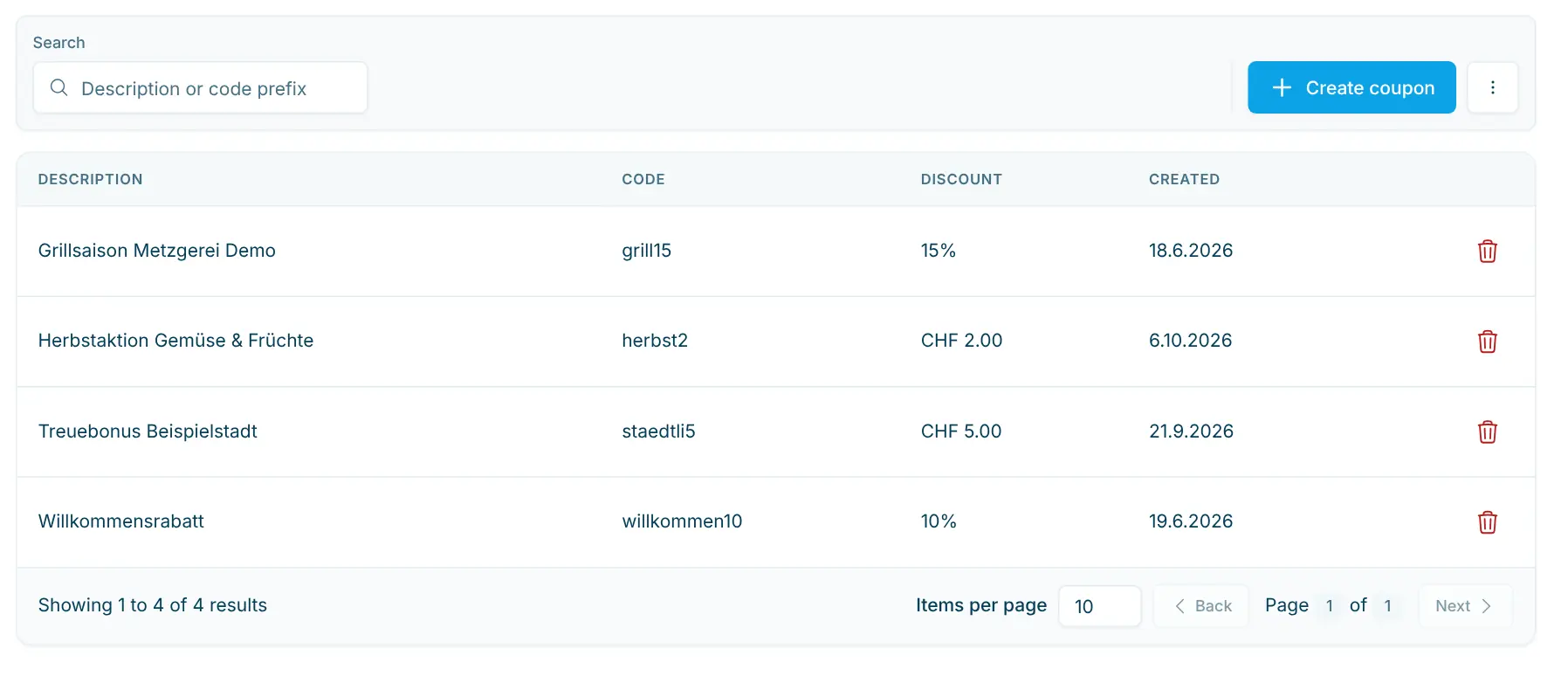
    All discount codes

    Description, code, discount and creation date. Search finds codes by description or the start of the code; the menu exports the list as CSV.

    app.scango.ch
    List of discount codes with search and the “Create Coupon” button
  2. 2

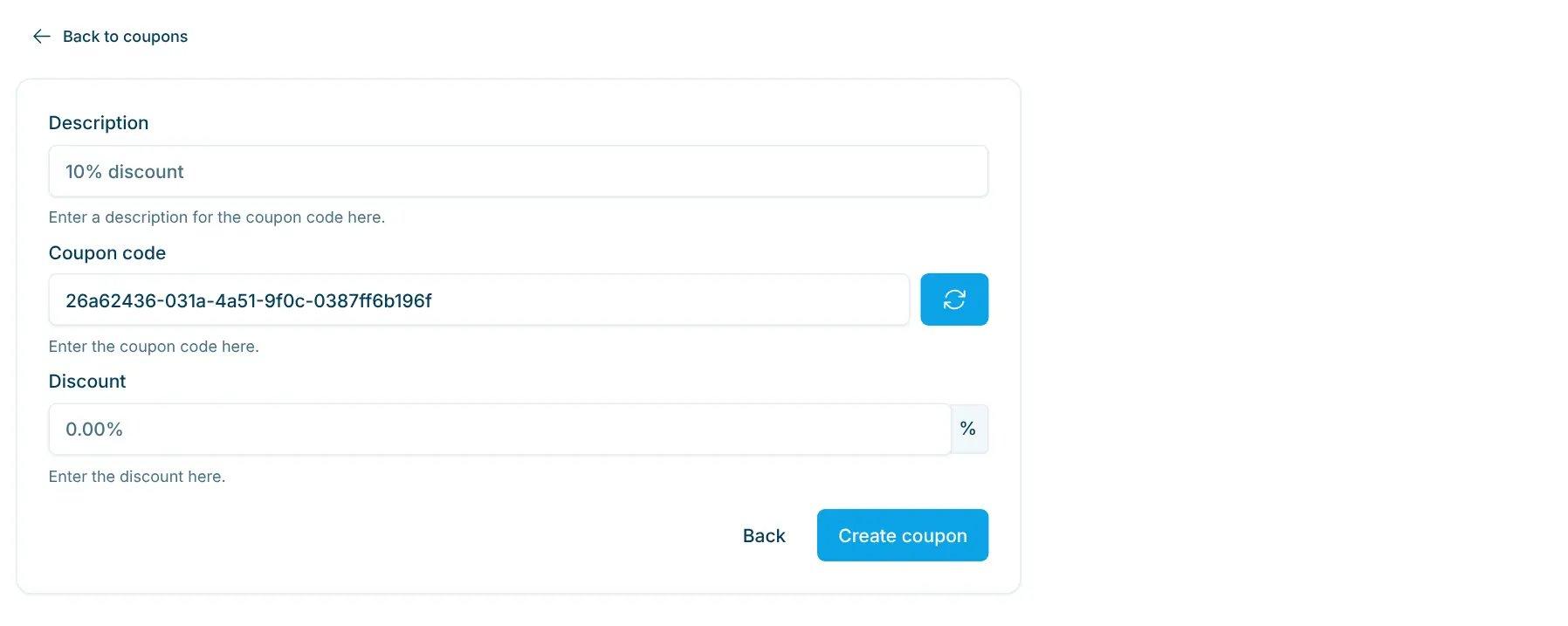
    Create a discount code

    Description, code and discount in percent. The code is pre-filled at random or can be chosen freely; the description is shown at the checkout.

    app.scango.ch
    Form for a new discount code with description, coupon code and discount
  3. 3

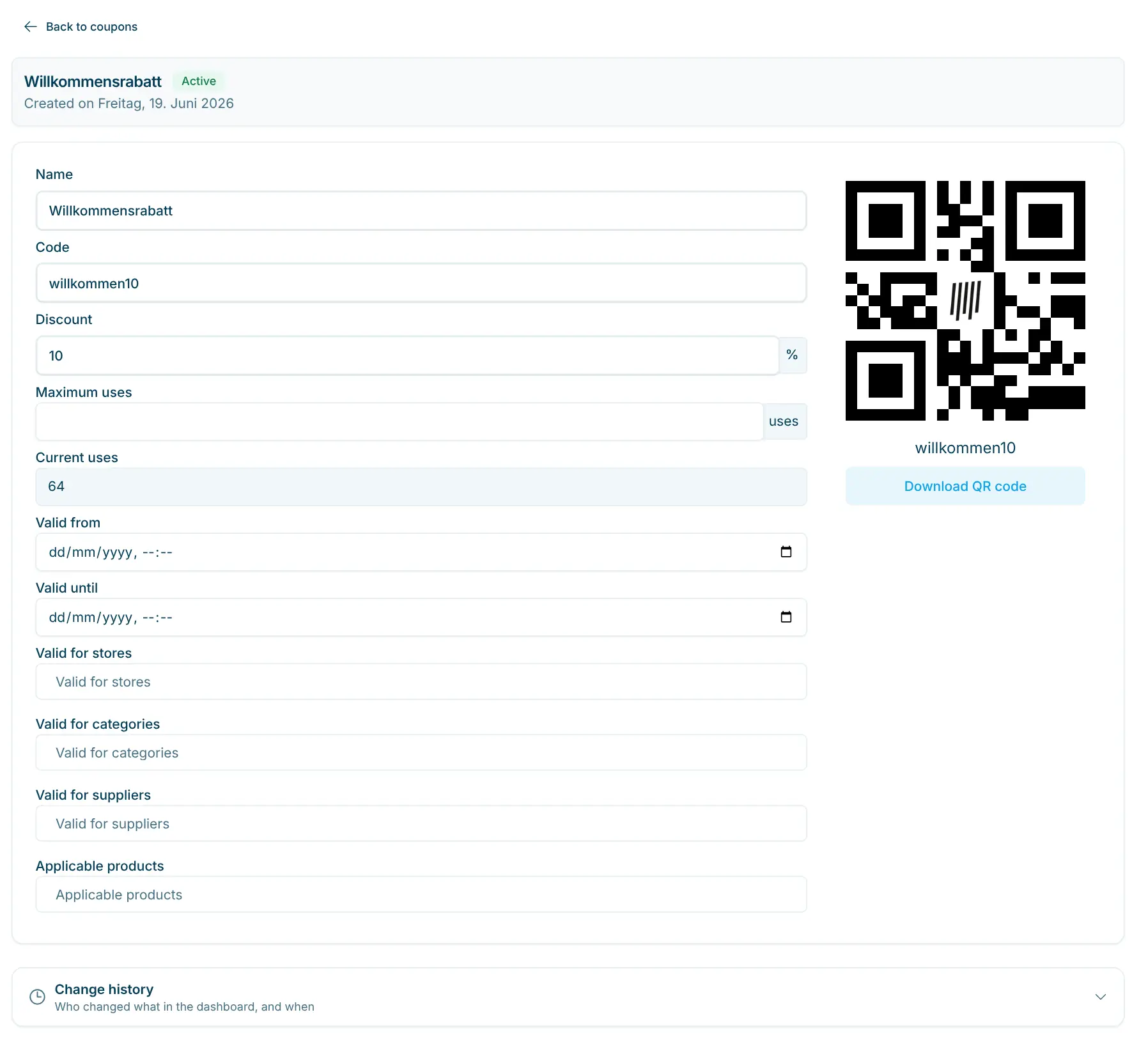
    Validity and restrictions

    “Valid from” and “Valid until”, plus stores, categories, suppliers and products. Empty means no restriction; changes are saved automatically.

    app.scango.ch
    Fields Valid from, Valid until and Valid for stores, categories, suppliers and products
  4. 4

    Download the QR code

    The QR code sits on the right of the detail page. “Download QR code” saves it as a PNG for your print template.

    app.scango.ch
    QR code of a discount code with the “Download QR code” button
  5. Read the full guide
Good to know

What discount codes are good for

Discount codes suit promotions that should run without staff: a welcome discount on flyers, a seasonal promotion on one supplier’s products or a discount for a single store. One discount code applies per purchase. Unlike a gift card, a discount reduces the price: Statistics deducts it proportionally, while the financial report counts products at their regular price.

Requirements
Plan
Retail or Pro
Access
from the Employee role
Checkout scanner
QR code recognition enabled
In operation
Discount
in percent, 0 to 100
Per purchase
one discount code
Deposit
not discounted
Export
CSV (coupons.csv)
Costs
Retail plan
CHF 179.–/month, first checkout included
scango.ch

More features

Retail plan

Gift cards

Issue, top up and redeem balance cards at self-checkout – with history.

All plans

Product management

Prices, barcodes, VAT, deposit, age and visibility – maintain your assortment yourself.

Retail plan

Statistics

Revenue, margin and VAT by product, store, supplier and payment – including CSV.

Pro plan

Supplier payouts

Periodic payouts to suppliers – draft, finalize, PDF/Excel and email.

Frequently asked questions

How do customers redeem a discount code?

They scan their products first and then the discount code’s QR code at the checkout scanner. The checkout deducts the discount from the eligible products.

Can discounts be combined?

No. One discount applies per purchase. If a customer scans a second one, the checkout says there is already a discount in the purchase.

What happens after expiry or when all uses are used up?

Outside “Valid from” and “Valid until”, once the maximum uses are reached or if the code was deleted, the checkout reports that the discount code is not valid.

Are there discounts in francs as well?

New discount codes always give a percentage discount. Older discount codes with a fixed CHF amount keep working unchanged.

The checkout scanner does not read the QR code. What now?

QR code recognition needs to be enabled on the scanner; the barcode scanner guide explains how. Print the code dark on a light background and not too small.

How do I end a promotion early?

Set “Valid until” to a past date or delete the discount code. Do not change the code once the QR code has been handed out: printed QR codes would stop working.

Tobias Kobelt

Hi, I’m Tobias.

Happy to help. Sign up for free to get a first impression – or request a non-binding quote. I’m here if you have questions.

Tobias Kobelt · scango.ch