Cloud Dashboard
Discount codes
Discount codes let you give your customers a percentage discount at the self-checkout. Every discount code has its own QR code: you print it (for example on flyers, vouchers or customer cards) and the customer scans it at the checkout while shopping. Validity period, maximum uses as well as stores, categories, suppliers and products let you control exactly when and for what the discount applies.
You will find the feature in the menu under Coupons. All roles from Employee upwards have access; the feature is included in the Retail and Pro plans.
Overview
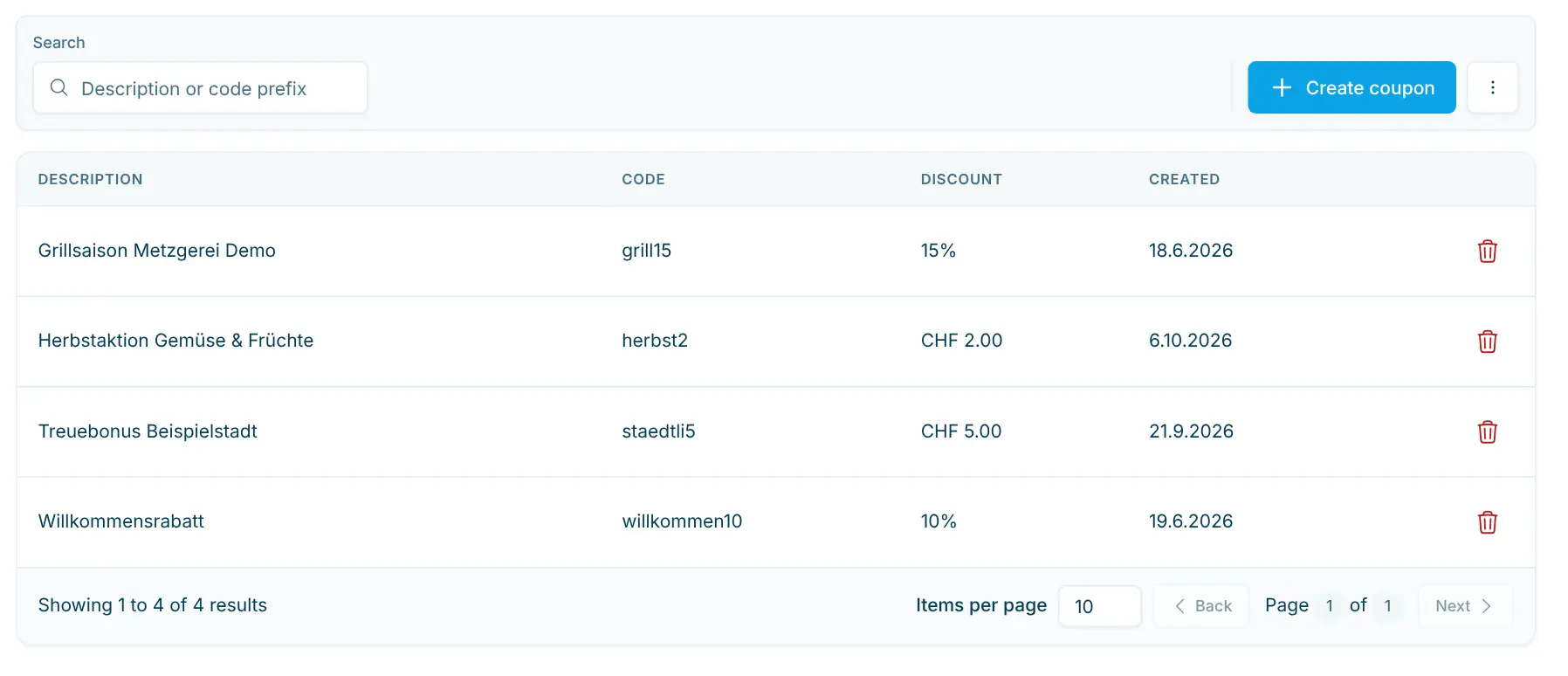
The list shows all discount codes of your organization with the following columns:
Column | Content |
|---|---|
Description | Your name for the discount code, e.g. "Discount 10%". It is shown at the checkout. |
Code | The content of the QR code that the checkout recognizes when scanning. |
Discount | Amount of the discount in %. |
Created | Date on which the discount code was created. |
Use the Search field to find discount codes by description or by the beginning of the code. With many entries, use the page navigation below the table. Clicking a row opens the detail page.
Create a discount code
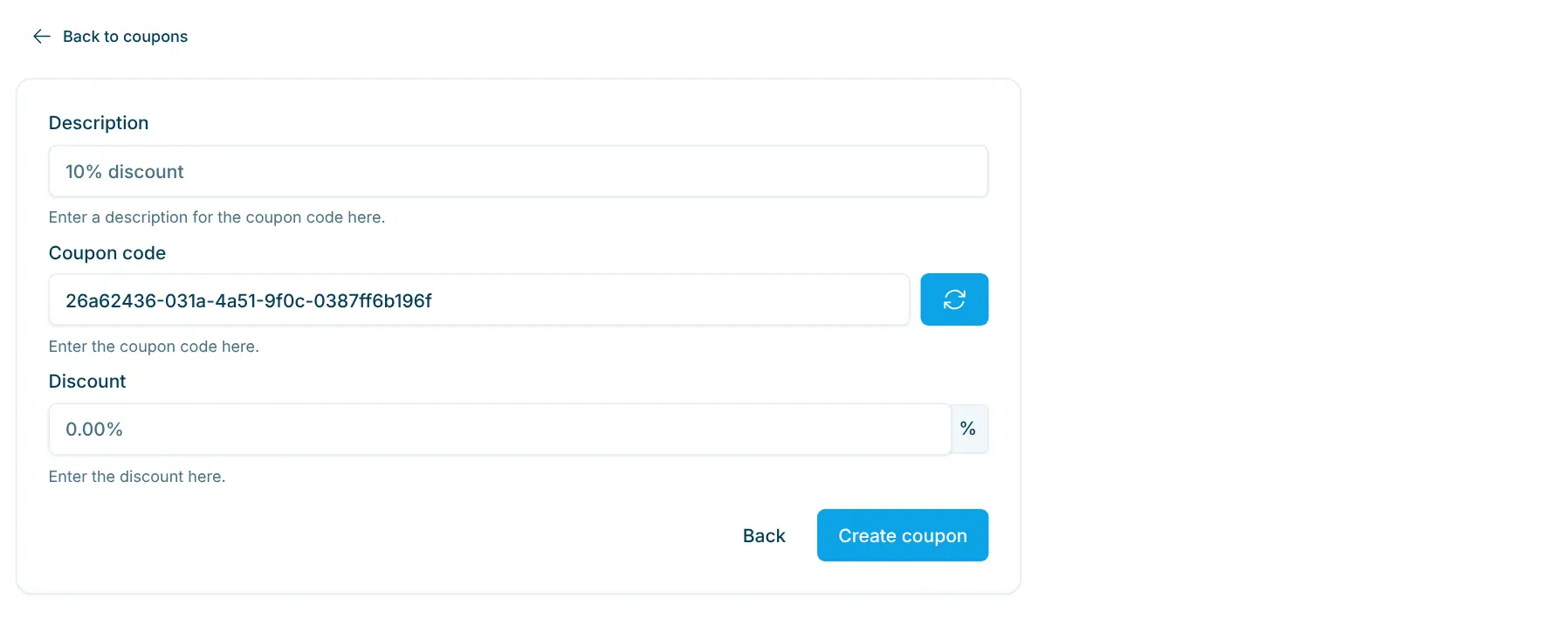
- In the overview, click Create Coupon.
- Under Description, enter a short, clear name, e.g. "Discount 10%" or "Opening offer". This text appears at the checkout.
- The Coupon Code field already contains a random code. The ↻ button next to it generates a new one. You can also define the code yourself (at least 3 characters). Lowercase letters, digits and hyphens are allowed; uppercase letters, spaces and umlauts are converted automatically.
- Under Discount, enter the discount as a percentage, e.g.
10for 10% (value between 0 and 100). - Click Create Coupon.
The discount code is valid immediately and you are taken straight to its detail page. There you can set restrictions if needed.
New discount codes always grant a percentage discount. Older discount codes with a fixed amount in CHF are still shown with "CHF" and keep working unchanged.
Edit and restrict a discount code
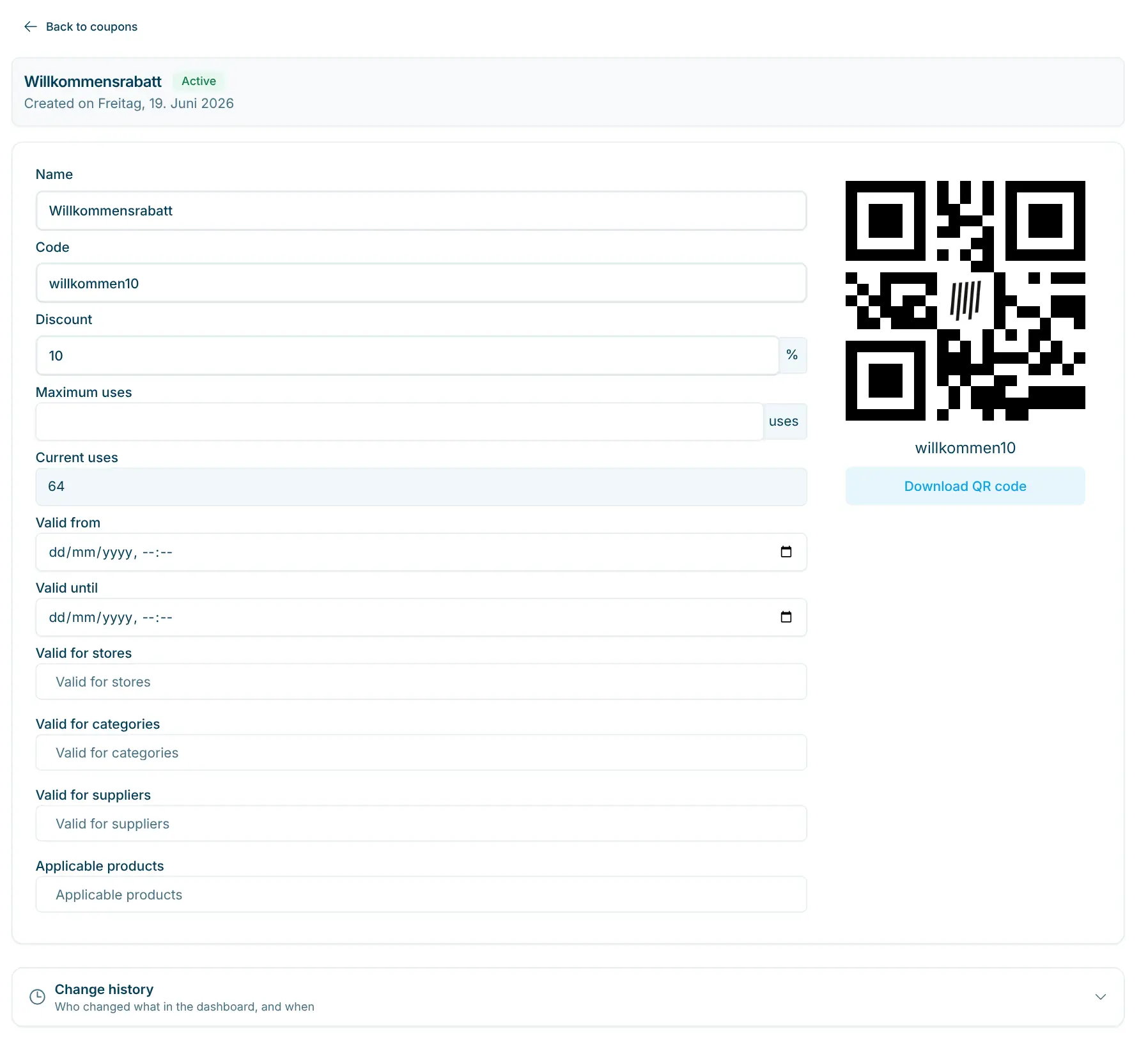
At the top of the detail page you see the name of the discount code, its status next to it (Active, Expired, Not yet valid, Used up) and, below it, the date under Created on. All fields can be edited directly. Changes are saved automatically; a short message confirms the save.
Field | Meaning |
|---|---|
Name | Name of the discount code (shown as "Description" in the list). |
Code | Content of the QR code. If you change the code, the QR code changes too – QR codes that have already been printed will then stop working. |
Discount | Amount of the discount in %. |
Maximum uses | How many times the discount code can be redeemed in total. Empty or 0 = unlimited. |
Current Uses | How many times the discount code has already been redeemed (display only). |
Valid from / Valid until | Period in which the discount code is accepted at the checkout. |
Valid for stores | The discount only applies in the selected stores. |
Valid for categories | The discount only applies to products in the selected categories. |
Valid for suppliers | The discount only applies to products from the selected suppliers. |
Applicable Products | The discount only applies to the selected products. Search for the products by name. |
Empty restriction = no restriction. If several restrictions are set, the discount is only granted on products that meet all of them – e.g. only products in the category "Beverages" and from the supplier "Sample Ltd".
Below the form, the Change history shows who changed what on the discount code, and when.
Print the QR code
The QR code of the discount code is shown on the right of the detail page. Download QR code saves it as a PNG image. You can insert this file into your own print templates, for example for flyers, vouchers or posters.
💡 Print the QR code dark on a light background and not too small so that the checkout scanner reads it reliably.
Redeem a discount code at the checkout
- The customer scans her products as usual.
- She scans the QR code of the discount code at the checkout scanner.
- The checkout checks the validity period and maximum uses and deducts the discount from the eligible products.
Good to know:
- Only one discount can be applied per purchase.
- Every redemption increases Current Uses by 1. Once Maximum uses is reached, the checkout reports that the discount code is no longer valid.
- Outside Valid from / Valid until, or for deleted discount codes, the checkout reports that the discount code is not valid.
- If the checkout scanner does not read the QR code, QR code recognition must be enabled on the scanner – see Barcode scanner.
Export discount codes
- In the overview, open the ⋯ menu and select Export CSV.
- In the Export coupons dialog, click Prepare export.
- Download the file
coupons.csv. You can open it in Excel, for example.
Delete a discount code
In the overview, click the trash can icon in the row of the discount code and confirm with Delete Coupon. A deleted discount code is no longer accepted at the checkout. If you only want to end a promotion, you can instead set Valid until to a date in the past.
Tips
- Choose a meaningful description – it appears at the checkout.
- For time-limited promotions, set Valid from and Valid until so you don't have to delete the code manually.
- Don't change the code of a discount code once its QR code has been printed and handed out.