Know-how
Stellard Age age verification
Stellard Age checks ID documents at the entrance and releases the door or fridge – or denies the release. Hardware, software and support come from one source. You'll find the product overview under Stellard Age age verification.
After the age check, Stellard Age releases the store door or a fridge. Separate from this is the age check at the checkout for individual products with the setting Product is age restricted: there, your staff release the payment with the age verification QR code (see Hardware).
Dimensions
Compact scan terminal for installation on a door or fridge.
| Height | 25 cm |
| Width | 16.5 cm |
| Depth | 9 cm |
| Display | 7 inch (portrait) |
Install the device protected from the weather and direct sunlight.
Technical data
- AI-assisted document recognition (ID card, driving licence, passport)
- 7-inch HD touchscreen
- Single camera, 12 MP, fixed focus
- Built-in block list management
- Wi-Fi or Ethernet
- ARM Cortex-A76 quad-core, 8 GB RAM, 64 GB storage
- Relay output for lock or door opener (external circuit, see below)
The age limit is 18 by default. If needed, scango.ch adjusts it on request; there is no setting for it in the dashboard. Every scan is logged (see the section "Identity logs and block list in the dashboard" below).
Wiring at the lock
The Stellard device Age switches an external circuit via a relay. It does not power the lock itself. Which variant you need depends on the lock – we clarify this at installation.
Door opener / doorbell lock (close the circuit)
These locks open when current flows.
- At rest the circuit is open, the door stays locked.
- On a valid scan, Stellard Age briefly closes the circuit.
- The door opener energises, the door can be opened.
- Then the relay opens the circuit again.
Typical: potential-free normally open (NO) contact on the relay, in series with the lock voltage.
Magnetic lock (interrupt the circuit)
Magnetic locks stay locked while current flows and release when power is cut.
- At rest the circuit stays closed, the magnet holds the door.
- On a valid scan, Stellard Age briefly interrupts the circuit.
- The magnet releases, the door can be opened.
- Then the relay closes the circuit again, the magnet holds once more.
Typical: potential-free normally closed (NC) contact on the relay, in series with the magnet voltage.
External power for the door opening
Lock and door opener need their own suitable power supply (depending on the lock, e.g. 12 V or 24 V). Stellard Age only switches this circuit; it does not supply lock voltage from the device.
Starting the device
After plugging in, startup takes noticeably longer than you'd expect from a tablet. The operating system boots first; the screen only comes on late.
A black or dark screen for the first few minutes is normal. Don't unplug the device and don't press the power switch just because there's no picture yet. Wait until the scan screen appears.
Power switch
The switch sits at the bottom right behind the screen (seen from the front, slightly set back).
- To switch off: press briefly and wait until the device has shut down, then unplug it.
- To switch on: connect power.
In daily use, Stellard Age typically stays connected to mains power and switched on (24/7 operation).
How a scan works
- The customer places the ID with the machine-readable line facing up under the device.
- Stellard Age checks the age and any blocks.
- On approval, the relay switches (close or interrupt, depending on the lock).
- On denial, the door stays locked.
Identity logs and block list in the dashboard
Under Identity logs, the dashboard shows every scan and lets you manage the block list. The page is activated on request for organizations with Stellard Age; the Admin and Owner roles have access.
Scans
The Scans tab lists all ID scans with Date, Location (store), Source (document type: Swiss identity card, Swiss driver's license (old), Swiss driver's license (QR code) or passport), Access (Allowed or Denied) and Status. Use Filters to narrow the list by period (e.g. Today, Yesterday, 7 days, 30 days or From/To), location, source and access.
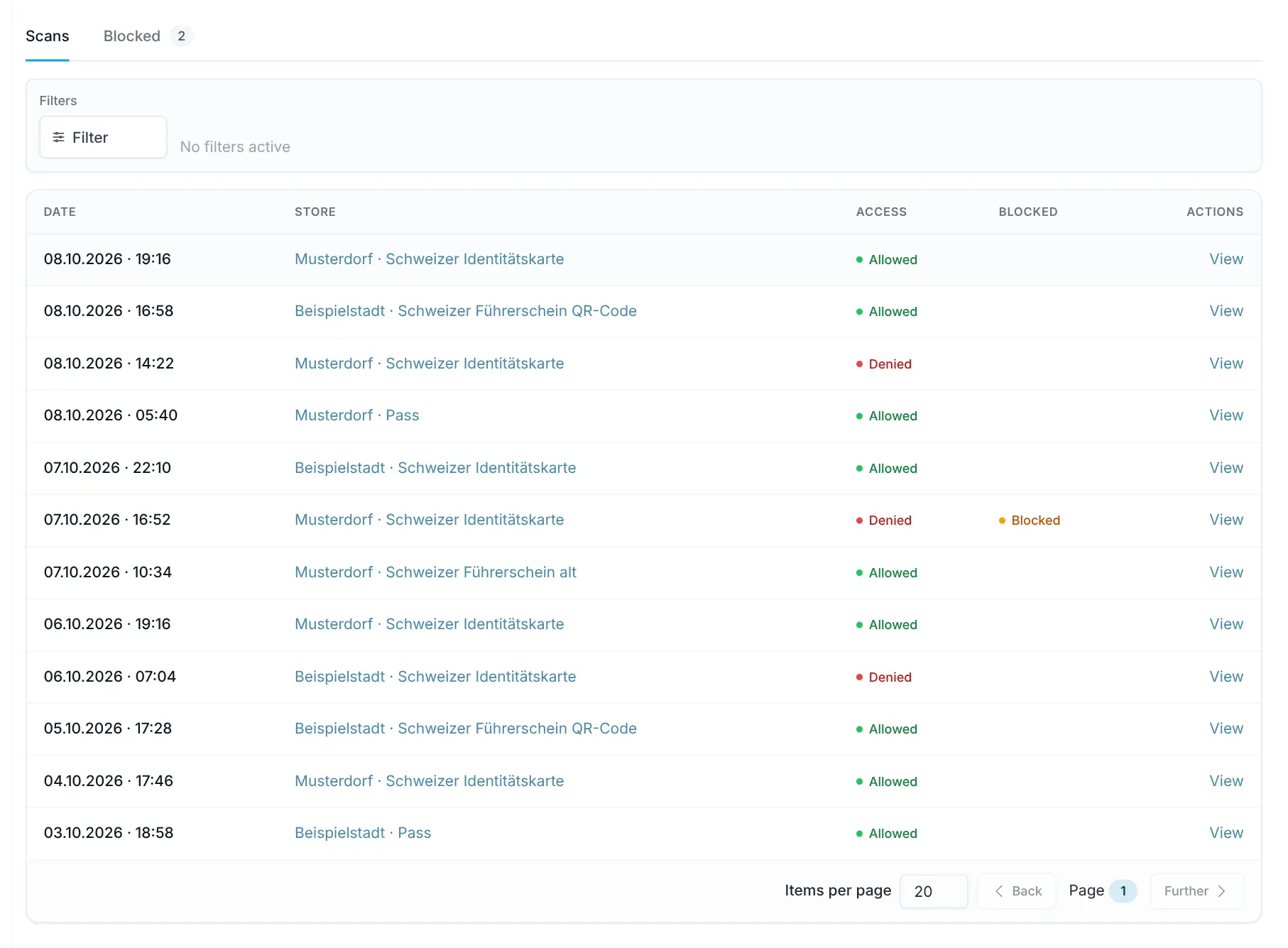
Clicking a scan opens the details with Date of birth, Scan image and Raw data.
Block an ID
Stellard Age rejects blocked IDs even if the age is sufficient. Blocking works by date of birth: every ID with this date of birth is blocked.
- From a scan: Open the scan and click Block ID. Enter First name, Last name and a Comment (reason for blocking) and confirm with Block. The date of birth is taken from the scan.
- Manually: In the Blocked tab, click Add block and enter first name, last name, date of birth and comment.
The Blocked tab shows all blocks with Name, Date of birth and Comment. Use Edit to change an entry and Delete to lift the block; the ID can then be used again.
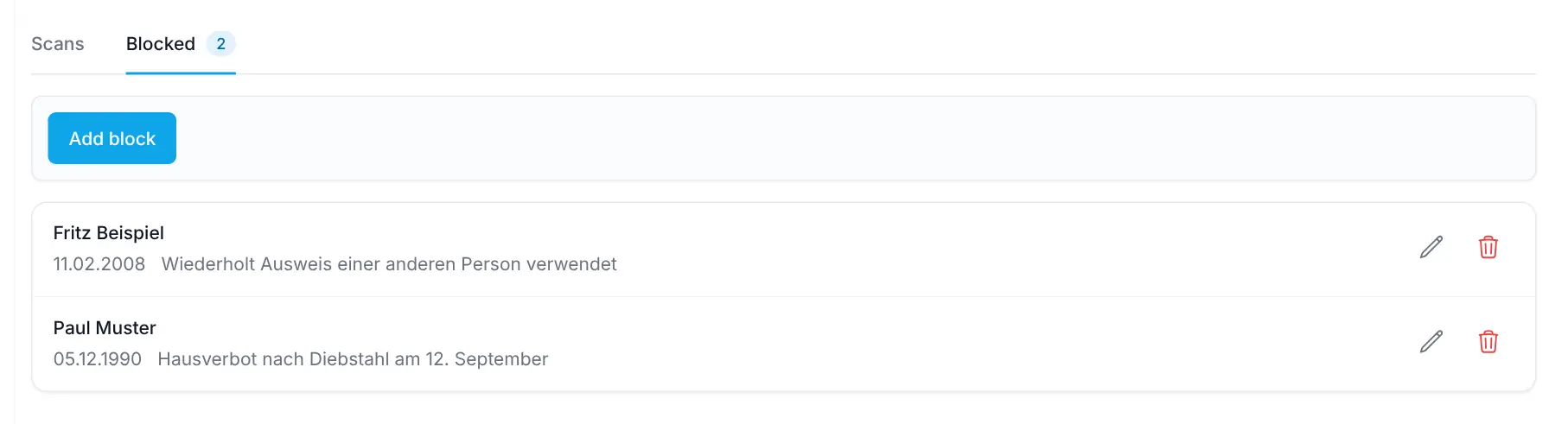
Identity logs and the block list can also be retrieved and managed via the API. If your organization uses the scango.ch staff app, you can open a door remotely there under Open access ("Slide to open").