Use case · Farm shop
Your farm shop keeps selling, even when you’re out in the fields
Customers weigh vegetables at the scale and pick eggs or bread without a barcode on the screen. They pay by card, TWINT or – if you like – cash into the cash box. Every sale lands in the Cloud Dashboard.
In use
Landlicht Burgdorf: farm produce from 8 am to 9 pm
Since summer 2023, Landlicht on the Dammstrasse in Burgdorf has sold seasonal, regional farm produce on a self-service basis – fully unattended. For vegetables and fruit there is an external vegetable scale right next to the checkout.
- Location
- Dammstrasse 58, Burgdorf
- Open since
- summer 2023
- Range
- seasonal, regional farm produce
- Opening hours
- 8 am to 9 pm
- Staff
- none, fully unattended
- Scale
- external vegetable scale next to the checkout
At a glance
What a farm shop needs
The features that matter in a farm shop
Loose produce, items without a barcode and customers who like to pay cash: these six features make a farm shop without staff possible – right down to settling up with neighbouring farms.
All plans
Manual selection
Pick items without a barcode by image and category – fresh and specialty goods.
All plans
Product management
Prices, barcodes, VAT, deposit, age and visibility – maintain your assortment yourself.
Example setup
What a farm shop with checkout and scale costs
A typical start: a compact checkout, a payment terminal and a scale for vegetables and fruit. We agree on the scale itself with you; the other prices are taken from our current price list, all excluding VAT.
If several farms sell in the same shop, the Pro plan at CHF 199.– per month lets you settle up with each farm separately. You can build your quote online yourself.
- Sunmi K2 mini self-checkout (15.6″, counter)
- CHF 1’490.–
- Payment terminal Freika PAX IM30
- CHF 1’190.–
- CH cabling
- CHF 20.–
- Scale with label printer
- by arrangement
- Total one-off (without scale)
- CHF 2’700.–
- Basis plan (checkout, Cloud Dashboard, card, TWINT, cash button)
- CHF 99.–
- Scale add-on
- CHF 49.–
- Total per month
- CHF 148.–
One-off
Monthly
Your day-to-day
How to run your farm shop from the farm
These images come straight from the Cloud Dashboard – this is exactly what you will see.
app.scango.ch
- 1
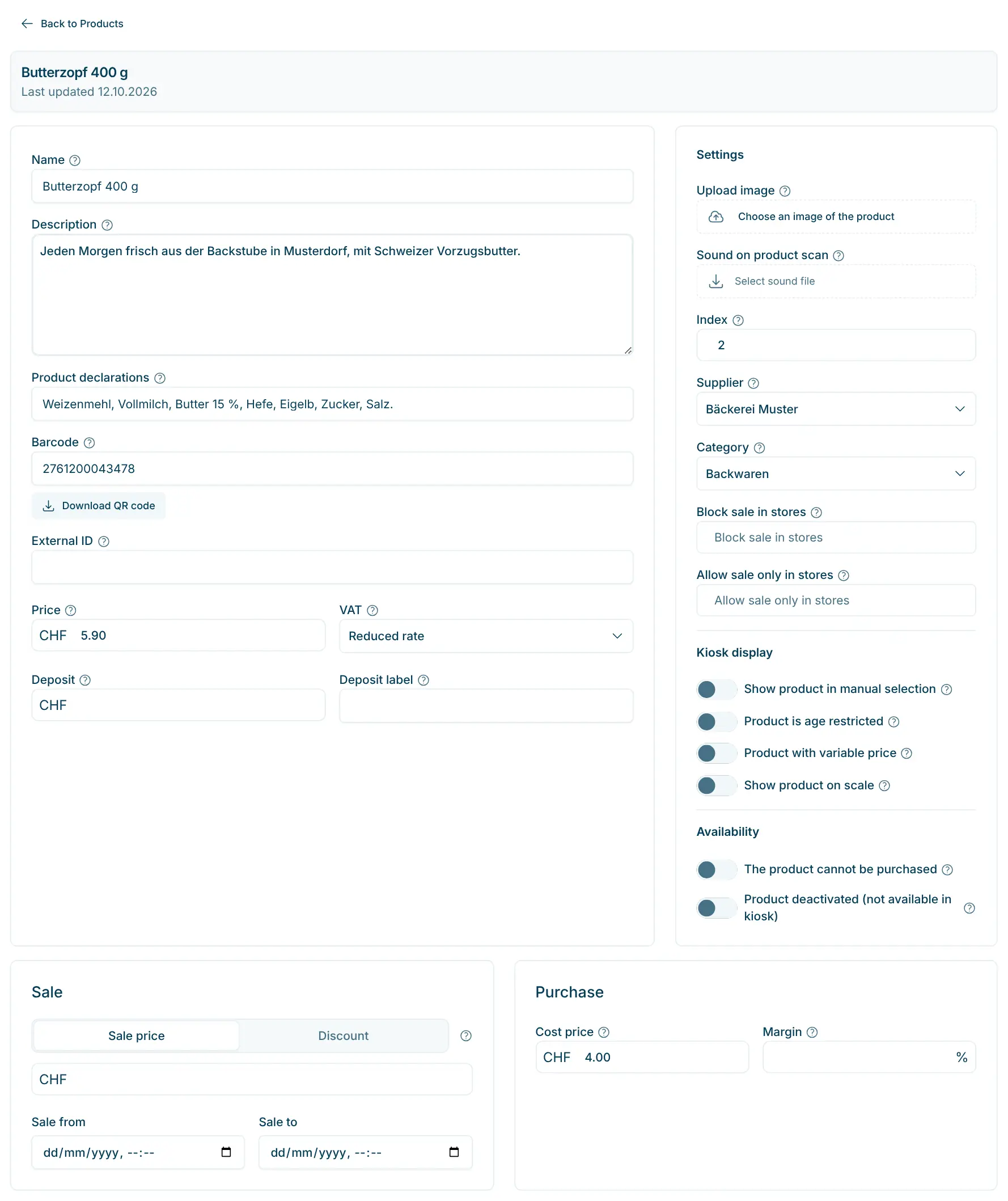
Enable products for scale and screen
For each product you decide whether it appears on the scale (“Show product on scale”) or can be chosen at the checkout without a barcode (“Show product in manual selection”).
app.scango.ch - 2
Pictures on the scale
In the store’s kiosk settings you switch on product images for the basket and for the scale screen. That way customers find carrots and apples at a glance.
app.scango.ch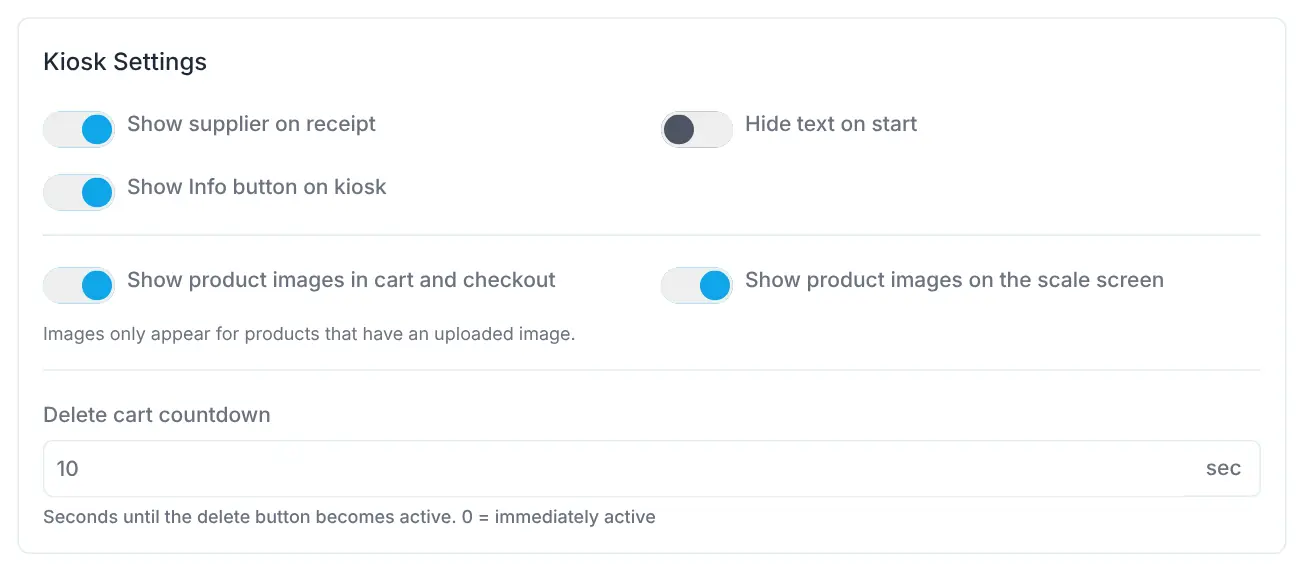
- 3
Every purchase, including cash ones
The list shows every purchase with time, total and products; the icon in front stands for card, cash or gift card. Cash purchases that nobody confirmed are under “Timeout”.
app.scango.ch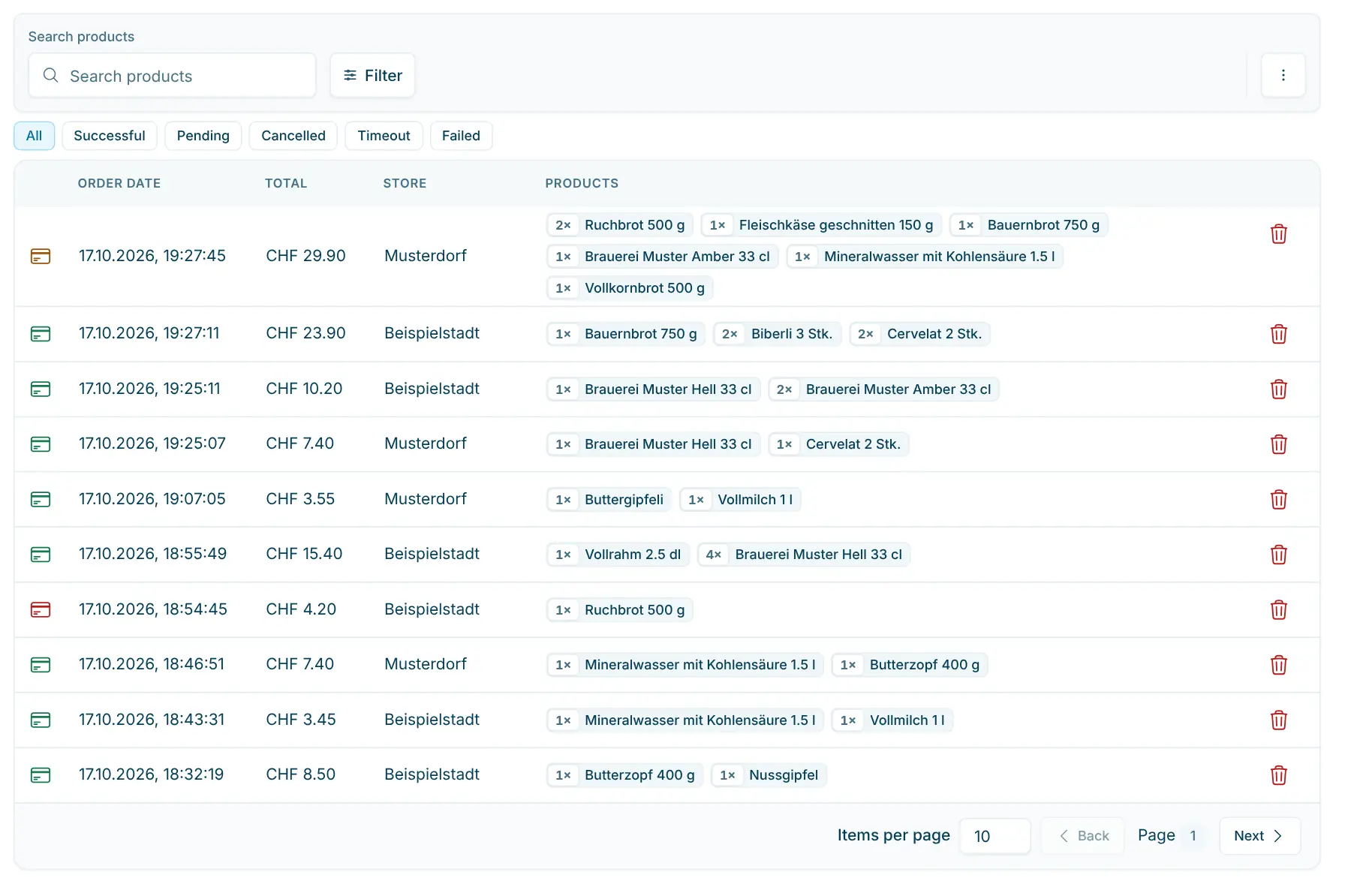
- 4
Settle up with each farm separately
If neighbouring farms sell through your shop, supplier payouts calculate revenue, VAT and your margin per farm – as a statement by email and a payment file for e-banking.
app.scango.ch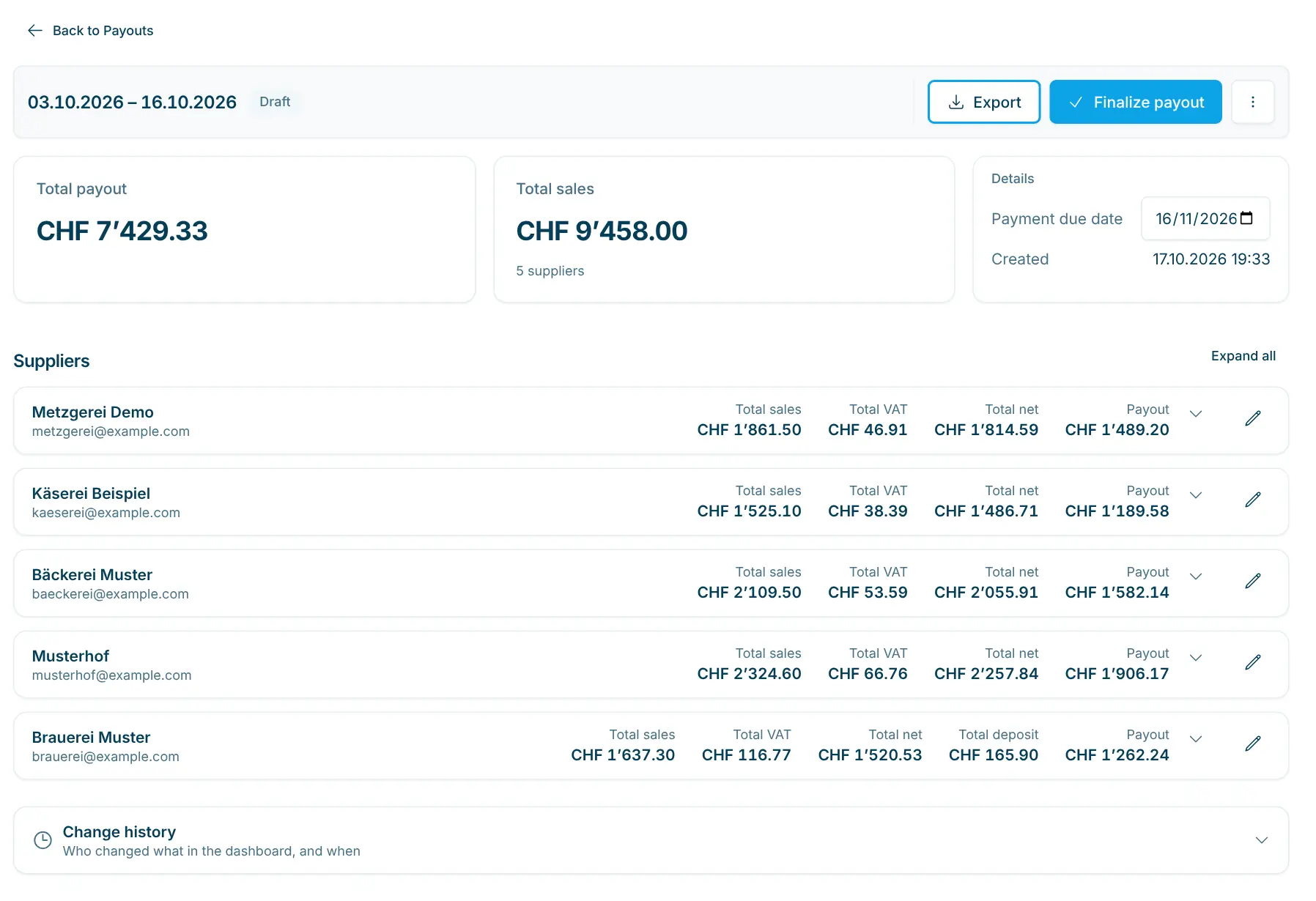
- Read the full guide
More farm shops
scango.ch already runs on these farms
Hofladen Frohberg
Uetikon am See ZH
Hofladen Schättin
Kirchberg SG
Hofladen Spargelblüte
Flaach ZH
Biohof Staubli
Muri AG
Lillys Hofgärtnerei
Cham ZG
All locations
More than 30 stores across Switzerland on the map
Frequently asked questions
Is a self-checkout worth it for a small farm shop?
The smallest combination of checkout, payment terminal and cabling costs CHF 2’700.– one-off, plus from CHF 99.– per month. In return every sale is recorded with product and payment method, even when you’re not in the shop, and you see what really sells.
How do I sell vegetables and fruit by weight?
At a separate scale station: customers place the goods on it, tap the product and take the printed label with weight and price. They then scan it at the checkout. We agree on the scale with you; the scale add-on costs CHF 49.– per month and store.
Can my customers still pay cash?
Yes, with the cash button. The checkout shows “Please put CHF … in the cash box”, and the customer confirms with “I have paid”. The checkout does not count money or give change, but the purchase is recorded with cash as the payment method. If you prefer, the checkout only offers cash when it is offline.
Several farms sell in my shop – how do I settle up?
With supplier payouts in the Pro plan: you assign every product to a farm and set your margin. For any period you choose, scango.ch calculates the payout per farm, sends the statement as PDF and Excel by email and creates a payment file for e-banking. The feature is in beta and is enabled on request.
My range changes with the seasons. Do I have to create the products again every year?
No. You set off-season products to “Product deactivated (not available in kiosk)”. They disappear from the checkout and can be reactivated next year with one click. You can change prices at any time, from your phone too.

Hi, I’m Tobias.
Happy to help. Sign up for free to get a first impression – or request a non-binding quote. I’m here if you have questions.
Tobias Kobelt · scango.ch