FeatureAll plans
Product management
Under Products you maintain everything your checkout sells: name, price, VAT, barcode, deposit, supplier and category. Every change saves at once and applies at the kiosk from the next purchase.
Why it matters
One catalogue for checkout, stock and price tags
Enter it once
Checkout, stock, price tags and statistics read the same product data. A new price is set in the dashboard and applies at the kiosk from the next purchase.
Sales with a start and an end
A sale price in CHF or a discount in percent, with date and time from and to. Afterwards the checkout sells at the normal price again.
Import from Excel or a price list
Column names and order do not matter, supplier price lists work directly. You see every change first, and nothing is saved until you confirm.
How it works
From a new product to the checkout
1 Create the product
Only the name is required. Usually barcode, price, VAT and, for returnables, a deposit follow. Without a barcode scango.ch assigns a unique code.
2 Choose the kiosk display
Switches for “Show product in manual selection”, “Product is age restricted”, “Product with variable price” and “Show product on scale”.
3 Set the stores
With “Block sale in stores” or “Allow sale only in stores” you control where the product is sold. Empty means everywhere.
4 Sell
The kiosk loads product data at the start of every purchase. The change applies from the next customer.
In the dashboard
What a product looks like
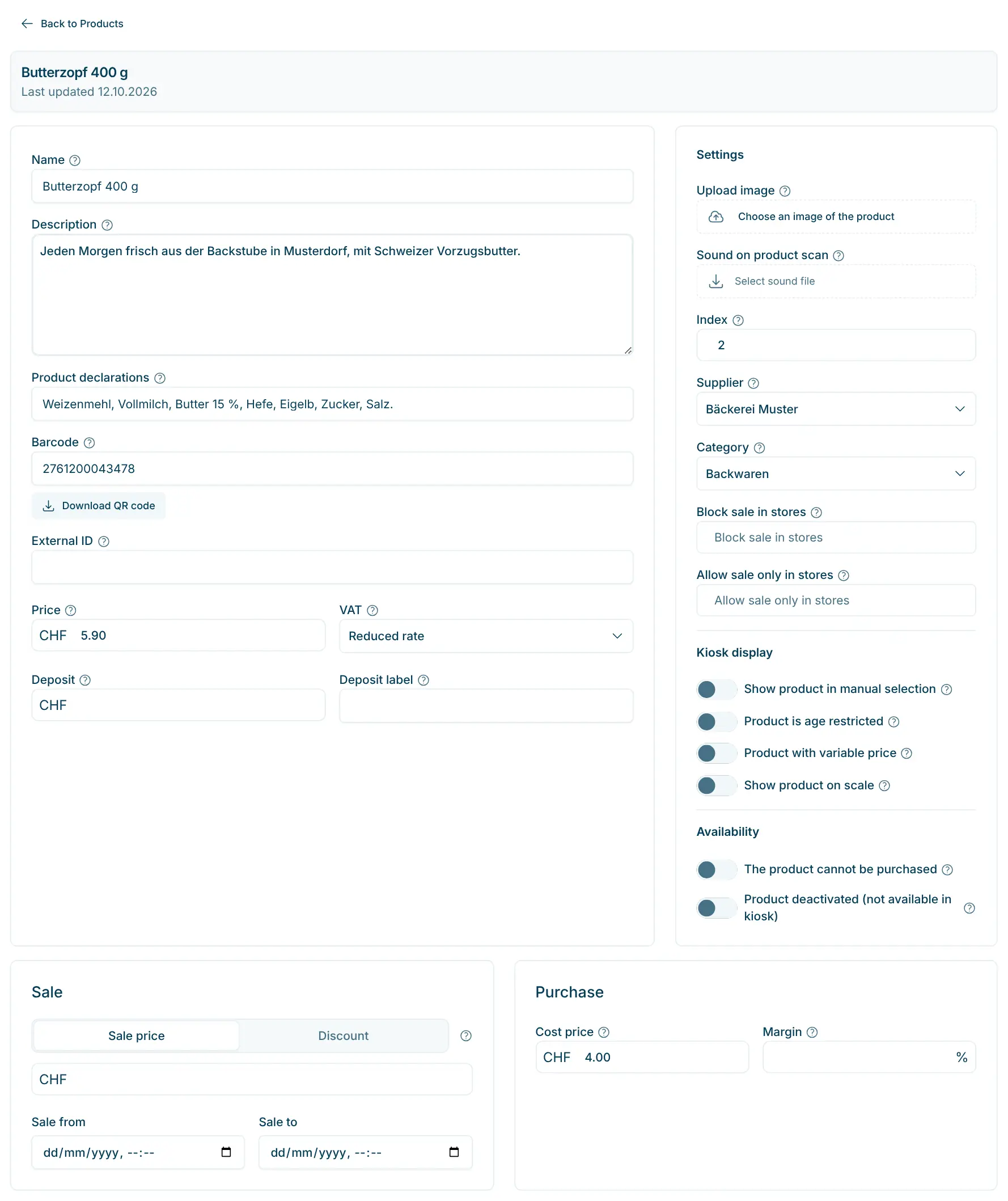
The images are taken straight from the Cloud Dashboard. The (?) icon next to each field briefly explains what it is for.
app.scango.ch
- 1
Basic data
Name, description, declarations, barcode, price, VAT and deposit. Customers see the declarations at the kiosk via the info icon.
app.scango.ch - 2
Settings and kiosk display
Image, supplier, category and stores, plus the switches for manual selection, age, variable price and scale. “Product deactivated” takes seasonal goods off the kiosk without deleting them.
app.scango.ch - 3
Sale and purchase
A sale only applies with a from and a to date. With the cost price scango.ch calculates the margins in the dashboard and in reports.
app.scango.ch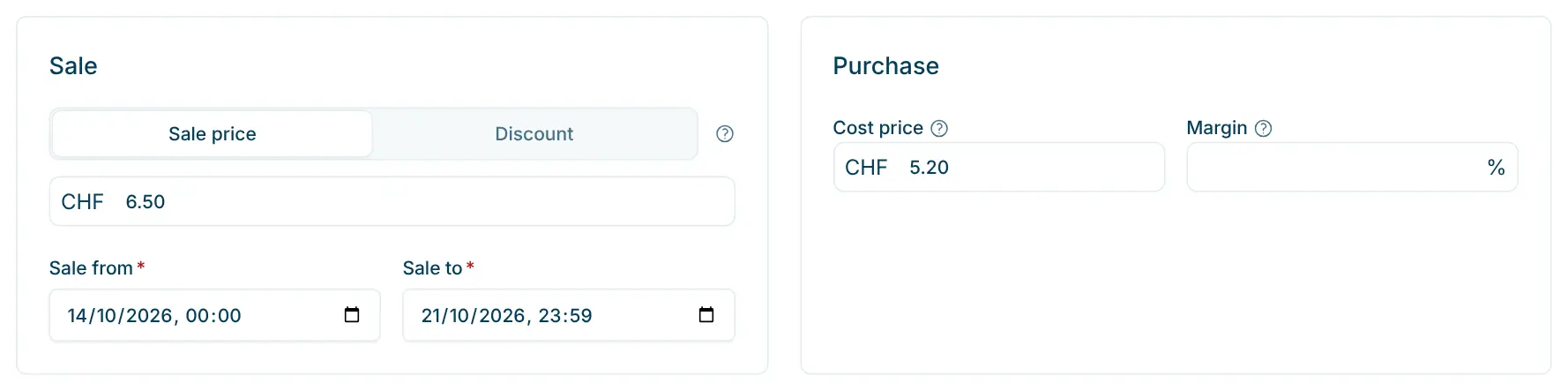
- 4
Import products
Upload an .xlsx or .csv, check columns and matches, see every row as “Create new”, “Update” or “Skip”. Only “Import now” saves.
app.scango.ch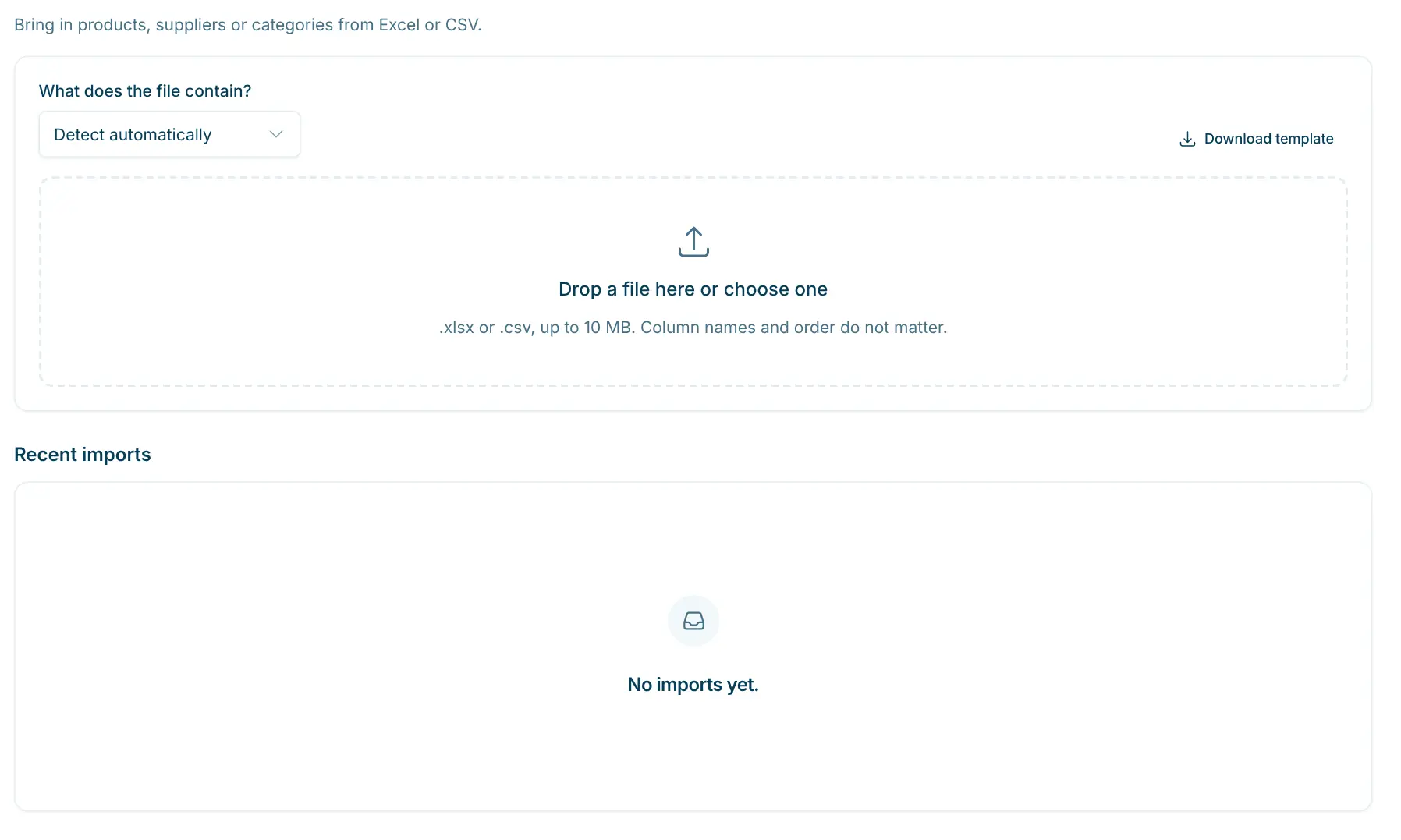
- Read the full guide
Good to know
What product management covers
Product management is part of every plan and the basis for everything else: stock management, price tags, discount codes and statistics use the same catalogue. Assigning and filtering by supplier is part of the Retail and Pro plans.
For goods with varying weight or price, such as pieces of cheese or meat, you enter a barcode template with PPPPP for the price or GGGGG for the weight. Empties are taken back with a deposit-return product at a negative price.
- Plan
- all plans, from CHF 99.–/month
- Access
- all roles from Employee, import only Admin and Owner
- Saving
- automatic as soon as you leave a field
- Barcodes
- EAN-13, EAN-8, UPC and QR codes
- VAT
- standard, reduced, special rate or exempt
- Files
- .xlsx or .csv, up to 10 MB and 20,000 rows
- Export
- CSV, can be imported again
Requirements
In operation
Import and export
scango.ch
More features
Retail plan
Discount codes
Percent or fixed amount on product, category or supplier – valid at self-checkout.
FAQ
Is product management part of the Basic plan?
Yes, it is part of every plan, from CHF 99.– per month. Assigning and filtering by supplier requires the Retail or Pro plan.
Why don’t I see a change at the kiosk?
The kiosk loads product data at the start of a purchase. Cancel a running purchase and start again. Also check whether the product is deactivated or blocked for the store.
How do I get my existing range into the dashboard?
With the import: upload an Excel or CSV file, also a supplier price list or an export from another system. The import recognises existing products by product ID, barcode, article number or a similar name.
What about products without a barcode?
Leave the barcode field empty. scango.ch assigns a unique code that you print with “Download QR Code” or via the price tags. Or you show the product in the kiosk’s manual selection.
Can I sell a product in one store only?
Yes. Add the store under “Allow sale only in stores”, or exclude single stores with “Block sale in stores”.
How do deposit returns work?
You create a deposit-return product, e.g. “Returnable bottle” with price -0.30, VAT exempt and visible in the manual selection. Customers select it at the kiosk for each container.

Hi, I’m Tobias.
Happy to help. Sign up for free to get a first impression – or request a non-binding quote. I’m here if you have questions.
Tobias Kobelt · scango.ch