Finances
Financial Reports
A financial report summarizes your revenue for a selected period: gross revenue, net revenue and VAT per tax rate, gift cards, deposits and the breakdown by store and payment method. The PDF serves as an accounting voucher; you import Excel and CSV into your accounting software or analysis tool.
You find the feature in the menu under Financial Reports. It is included in the Retail and Pro plans; the Admin and Owner roles have access.
Overview
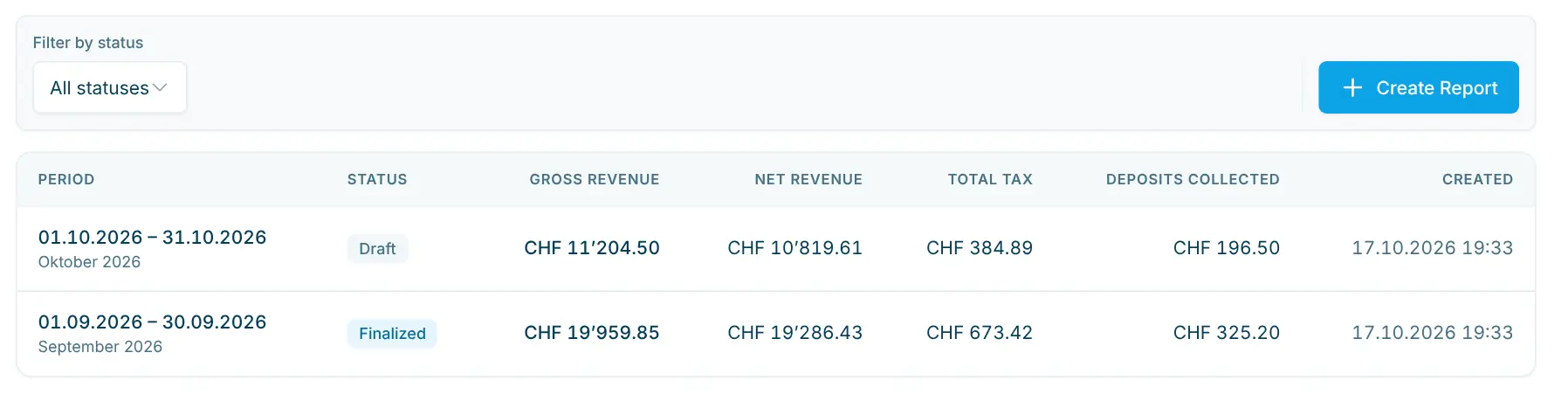
The list shows all reports with Period (the dates, with the period name such as "September 2026" below), Status, Gross Revenue, Net Revenue, Total Tax, Deposits collected and the creation date. Clicking a row opens the report. Use Filter by status to show only drafts or only finalized reports.
Create a report
- Click Create Report.
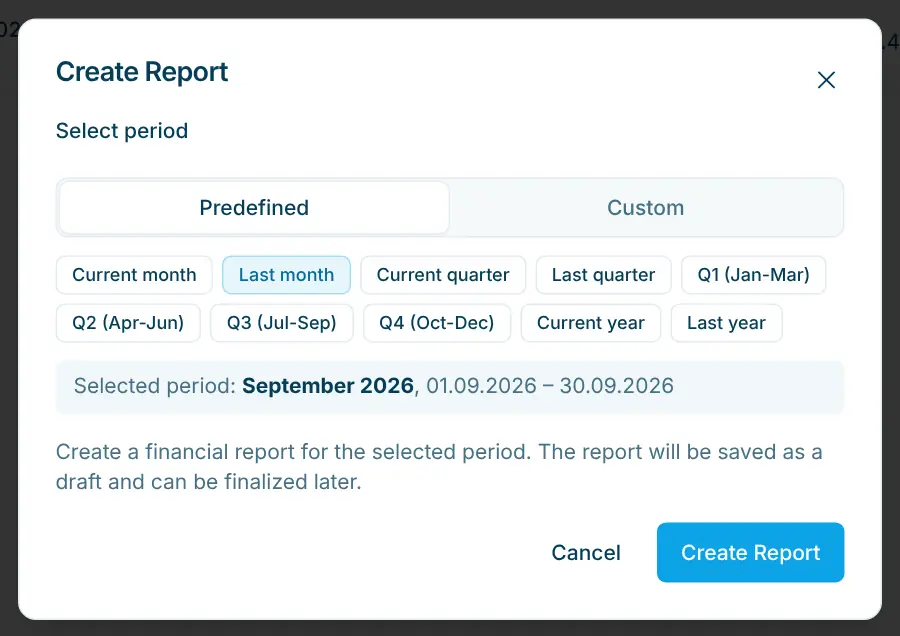
- Choose the period:
- Predefined: Current month, Last month, Current quarter, Last quarter, the quarters Q1 (Jan-Mar) to Q4 (Oct-Dec) of the current year, Current year or Last year.
- Custom: any period with From and To.
- Click Create Report. The report is calculated and saved as a Draft.
The values are calculated and saved when the report is created. If anything changes in the purchases of the period afterwards, delete the draft and create it again.
Contents of the report
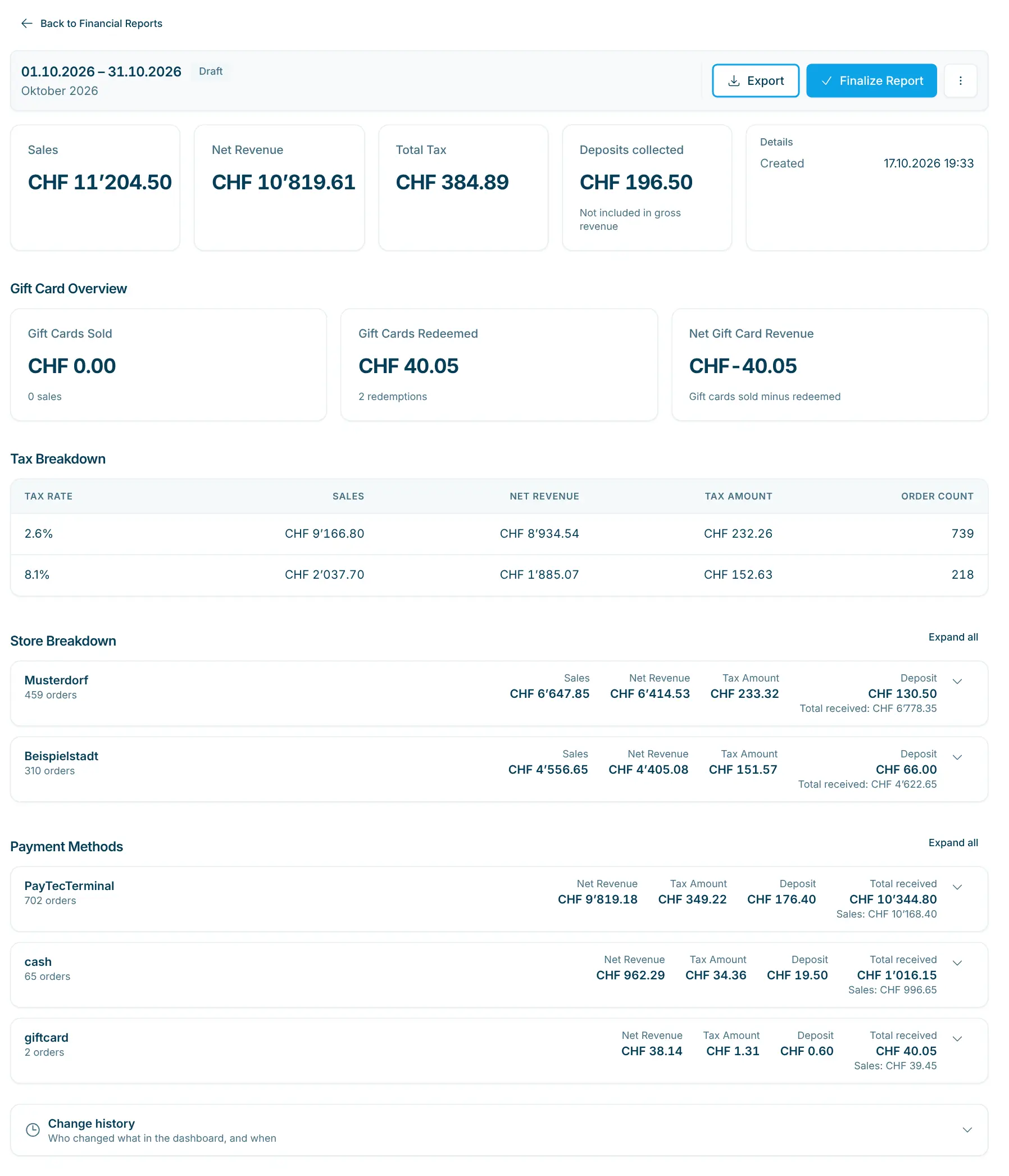
At the top are the period as title, the status and the actions (Finalize Report, Export, ⋯ menu). Below follow the key figures and the Details card with the period and the date, time and person of creation and finalization.
Area | Content |
|---|---|
Key figures | Gross Revenue (incl. VAT; called Sales as soon as deposits were collected), Net Revenue (excl. VAT), Total Tax and Deposits collected (only if any, "Not included in gross revenue"). |
Gift Card Overview | Gift Cards Sold and Gift Cards Redeemed (each with amount and count) plus Net Gift Card Revenue. |
Tax Breakdown | Per tax rate: Gross Revenue, Net Revenue, Tax Amount and Order Count. |
Store Breakdown | Totals per store (named by city), expandable By Tax Rate and By Payment Method with Sales, Deposit, Total received and number of orders. |
Payment Methods | Revenue incl. deposits per payment method of the purchases, expandable by tax rate. |
How it is calculated
Basis: all successful purchases whose purchase date falls within the period, from midnight to midnight in your organization's time zone (Settings › Organization › General). Cancelled, failed and deleted purchases do not count. The report shows revenue, i.e. what was sold, not the money received on your account.
Gross, net, tax: Gross revenue is the sum of sales prices incl. VAT, net revenue the sum without VAT. Gross revenue = net revenue + total tax always applies. The tax breakdown adds up to the same values. In Order Count, a purchase with products at two tax rates counts for both rates; the total can therefore be higher than the number of purchases.
Deposits: Deposits are not revenue. They appear separately as Deposits collected and are included in the Total received amount of the payment methods (at 0% VAT).
Gift cards:
- Selling (and topping up) a gift card counts as revenue, usually at 0% VAT, and appears under Gift Cards Sold.
- When a customer pays with a gift card, this is a payment, not revenue and not a revenue reduction. The products bought count fully as revenue; the amount appears under Gift Cards Redeemed.
- Net Gift Card Revenue = gift cards sold − gift cards redeemed. This is the change in outstanding balances during the period; the value can be negative if more was redeemed than sold.
- Under payment methods, "giftcard" stands for purchases paid with a gift card. The sale of a gift card appears under the payment method used to buy it.
Discount codes: Discounts are not deducted from revenue in the report; products count at their regular sales price. The statistics, by contrast, deduct discounts proportionally.
Example | Effect in the report |
|---|---|
Sandwich CHF 8.50 (2.6%), paid with a CHF 5.00 gift card and CHF 3.50 by card | Gross revenue + CHF 8.50; gift cards redeemed + CHF 5.00 |
Sale of a CHF 50.00 gift card, paid by card | Gross revenue + CHF 50.00 at 0%; gift cards sold + CHF 50.00 |
Drink CHF 3.00 plus CHF 0.50 deposit, paid in cash | Sales + CHF 3.00; deposits collected + CHF 0.50; total received (cash) + CHF 3.50 |
Export
Use Export › Export as PDF, Export as Excel or Export as CSV to download the report at any time, including drafts.
Format | Content |
|---|---|
"Financial Report" with all areas, in the language you use the dashboard in. Drafts carry the watermark DRAFT. | |
Excel | Sheets Summary, Tax Overview, Stores by Tax Rate, Payment Methods and Detailed View. |
CSV | One row per store, payment method and tax rate (English column names), for import into accounting software or a spreadsheet. |
💡 CSV files from the dashboard open in Excel with a double click, split into columns and with umlauts intact. If everything still ends up in one column, import the file via Data › From Text/CSV and choose semicolon as the delimiter.
Finalize or delete
- Finalize Report: Once you have checked the figures, finalize the report. It then stays in the list with its locked values for documentation. This step cannot be undone.
- Delete Report: In the ⋯ menu of the detail page, you delete a draft, for example if the period is wrong or purchases were corrected. Finalized reports cannot be deleted.
- Change history: At the bottom of the detail page you can see who created and finalized the report and when.
Status | Meaning |
|---|---|
Draft | Calculated, can be exported and deleted. |
Finalized | Locked, view and export only. |
Tips
- Create the report only after the period has ended, e.g. with Last Month at the start of the month.
- For supplier shares in a shop-in-shop, use payouts.